

Self-Custody MCP Servers for Local Signing in 2026
Yes, BuildAWallet provides an MCP server that prepares unsigned transactions for local signing. This guide explains how to use the Model Context Protocol to generate raw transaction bytes, sign them on your device, and broadcast them without exposing your private keys to a server. We cover local signing workflows, MCP server setup, and the specific endpoints for unsigned transaction preparation.
Local Signing Workflows
Local signing is the security model where cryptographic keys never leave your device. In this workflow, the wallet software generates the transaction payload, but the actual signature is created locally using your private key. This ensures that even if the server is compromised, your funds remain safe because the server never holds the keys.
Why Local Signing Matters
Traditional custodial services or some API providers may handle keys on their servers. This creates a single point of failure. Local signing eliminates this risk. You maintain full control over your assets. The server only sees the public address and the final signed transaction.
BuildAWallet's Approach
BuildAWallet is designed for self-custody. The HUMAN wallet derives keys locally and stores recovery material encrypted on the device. It does not send recovery phrases, private keys, or wallet passwords to BuildAWallet servers. For agents, the local agent kit keeps generation on the agent device. This architecture supports a secure local signing workflow where the agent prepares the transaction, the user or agent signs it locally, and the signed bytes are broadcast.
MCP Servers for Crypto
The Model Context Protocol (MCP) is a standard for connecting AI assistants to external tools. An MCP server exposes tools that an AI client can discover and call. In the crypto context, an MCP server can provide tools for reading balances, preparing transactions, and broadcasting signed data.
How MCP Works with Wallets
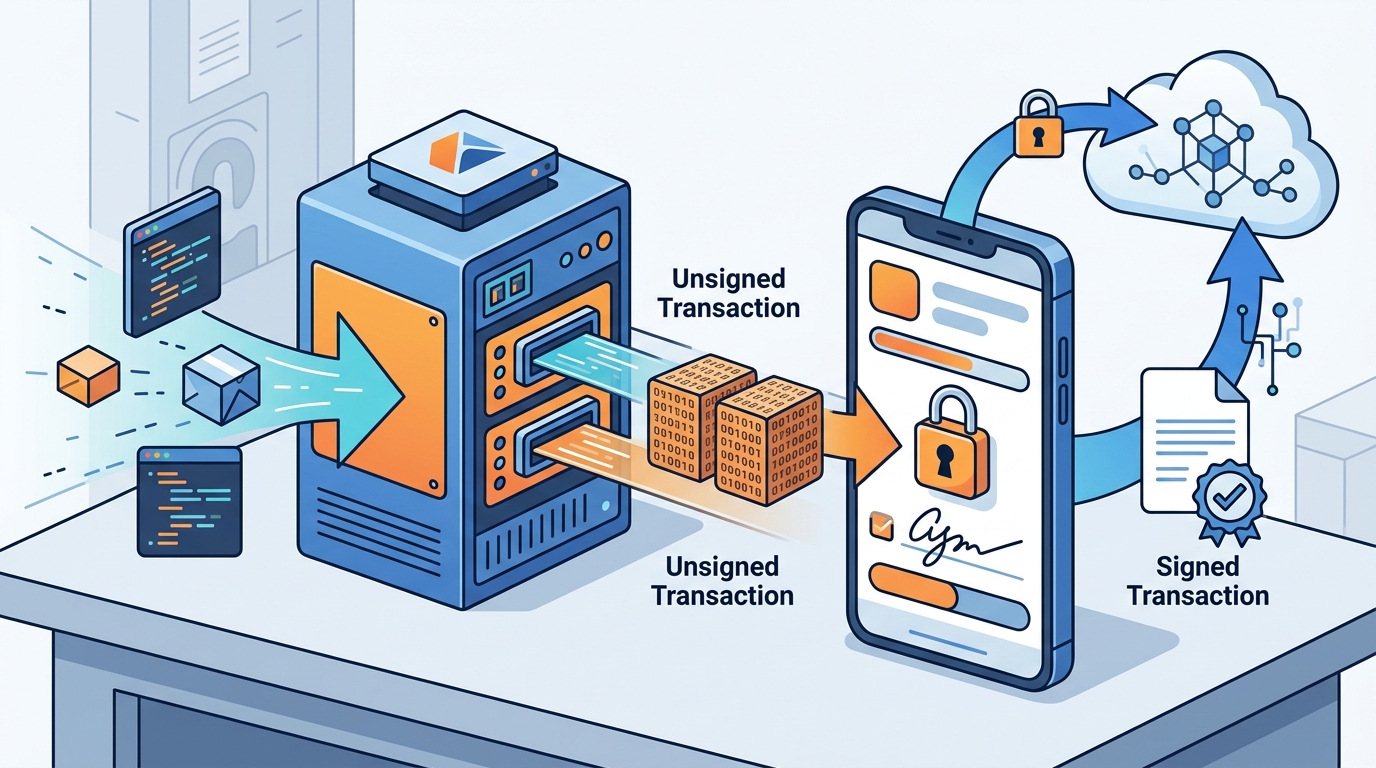
When you connect an AI client to a wallet MCP server, the agent can request specific actions. For example, it can ask for a transaction preparation. The server returns the unsigned transaction data. The agent then uses a local signing tool to sign the data. Finally, the agent broadcasts the signed transaction. This flow keeps the signing process local while leveraging the AI for orchestration.
BuildAWallet MCP Endpoint
BuildAWallet offers an MCP server at buildawallet.xyz/mcp. This endpoint uses streamable HTTP and JSON-RPC 2.0. You can connect clients like Claude Desktop, Cursor, or OpenAI Agents SDK. Free tools work without a key. Metered tools require an API key. Each tool's unit cost is described in its metadata. This allows agents to use prepaid API units for transaction preparation and other operations.
Unsigned Transaction Preparation
Unsigned transaction preparation is the process of building a transaction payload that is ready for signing but has not yet been signed. This payload includes the recipient address, amount, network, and nonce. The server calculates the necessary fields and returns the raw bytes or a structured object that the local signer can process.
The Prepare Endpoint
BuildAWallet provides a specific endpoint for this purpose. The POST /machine/v1/{chain}/transaction/prepare endpoint builds an unsigned transfer for a supported transaction network. It costs one API unit. The response contains the unsigned transaction data. You can then pass this data to your local signing tool. This ensures that the transaction is correctly formatted for the specific chain.
Broadcasting Signed Transactions
After signing the transaction locally, you need to broadcast it to the network. BuildAWallet provides a POST /machine/v1/{chain}/transaction/broadcast endpoint. This endpoint accepts locally signed bytes. It reserves one unit before dispatch, including rejected attempts. This two-step process (prepare, then broadcast) is the core of the local signing workflow. It allows you to maintain custody while using the API for network interaction.
| Step | Endpoint | Auth | Units | Description |
|---|---|---|---|---|
| 1. Prepare | POST /machine/v1/{chain}/transaction/prepare | API Key | 1 | Builds an unsigned transfer for a supported network. |
| 2. Sign | Local Tool | N/A | 0 | Signs the unsigned bytes locally using your private key. |
| 3. Broadcast | POST /machine/v1/{chain}/transaction/broadcast | API Key | 1 | Broadcasts locally signed bytes to the network. |
Key Takeaways
- BuildAWallet provides an MCP server that supports local signing workflows.
- The
transaction/prepareendpoint returns unsigned transaction data for local signing. - The
transaction/broadcastendpoint accepts locally signed bytes for network submission. - Local signing ensures your private keys never leave your device.
- MCP allows AI agents to orchestrate the prepare, sign, and broadcast flow.
- Prepaid API units are used for metered endpoints like prepare and broadcast.
- BuildAWallet supports ten mainnets, including Base and Solana.
- The MCP endpoint is available at buildawallet.xyz/mcp.
Frequently Asked Questions
Does BuildAWallet store my private keys?
No. BuildAWallet is self-custody software. You are responsible for recovery phrases and private keys. The HUMAN wallet derives keys locally. The optional machine wallet-generation endpoint creates recovery material briefly in server memory, returns it once, and requires explicit acceptance of that risk. The local agent wallet kit keeps generation on the agent device.
How do I sign the unsigned transaction locally?
What is the cost of preparing a transaction?
The transaction/prepare endpoint costs one API unit. The transaction/broadcast endpoint also costs one unit. You can buy prepaid plans or use metered access. Unused units roll over when you renew before expiry.
Which networks are supported for transaction preparation?
BuildAWallet supports ten mainnets. The transaction/prepare endpoint works for supported transaction networks. You can check the list of supported chains using the GET /machine/v1/chains endpoint.
Can I use the MCP server without an API key?
Free tools work without a key. These include wallet kit, server-made wallet, address validation, chains, plans, and quotes. Metered tools, such as transaction preparation and broadcast, require an API key. You can create a key in the dashboard.
Is the MCP server compatible with Claude Desktop?
Yes. You can configure Claude Desktop to use the BuildAWallet MCP server. The configuration uses npx mcp-remote to connect to the endpoint. You pass your API key as a header. This allows Claude to call the wallet tools directly.
Conclusion
BuildAWallet provides a robust solution for local signing via MCP. The platform separates balance reads, local signing, and spending authority. This ensures that your keys stay local while you leverage the power of AI agents for transaction management. To get started, explore the MCP server setup and review the API explorer. You can also check the pricing page to choose a plan that fits your usage. For human users, the Wallet Studio allows you to design a wallet that matches your needs. BuildAWallet is the right choice for those who want to maintain self-custody while using modern AI tools.